Gta Update
View or edit on GitHub
This page is synchronized from trase/data/brazil/logistics/gta/gta_update/Readme.md. Last modified on 2026-11-02 10:41 CET by dependabot[bot].
Please view or edit the original file there; changes should be reflected here after a midnight build (CET time),
or manually triggering it with a GitHub action (link).
Important - keep this directory in sync between DPAP and Trase's repo
This process is relevant both in Trase and DPAP, so keep it in sync between
* https://github.com/sei-international/TRASE : in trase/data/brazil/logistics/gta/gta_update
* https://github.com/ErasmuszuE/dpap: in scripts/DATA/gta_update
See "Keeping this directory in sync" at the end of this file for how.
Confidential data source. We access GTAs through Repórter Brasil's Rota do Gado service. Do not name Rota do Gado or Repórter Brasil as the data source in anything public. Internal documentation may name them.
Annual GTA update
Everything needed to refresh the GTA data lives in this folder, in the order it is run:
| Step | Script | What it does | Runs on |
|---|---|---|---|
| 1 | rotadogado_download.py |
Downloads GTAs from the Rota do Gado API into S3 | nmartin-general |
| 2 | check_gtas.py |
Audits what landed in S3, and lists anything to re-run | nmartin-general |
| 3 | interactive_ingest_to_duckdb.py |
S3 -> a local DuckDB database | SageMaker, cell by cell |
| 4 | interactive_export_to_bigquery.py |
DuckDB -> Parquet -> GCS -> a BigQuery table | SageMaker, cell by cell |
| 5 | Dataform (in the dpap repo) |
Cleans and consolidates the raw table | BigQuery |
| 6 | ../gtas_in_bigquery_to_s3.py, then ../register_gta_athena_tables.py |
Exports the consolidated table to s3://trase-storage/brazil/logistics/gta/gold/<version>/, and registers it in Athena (set the version in both, and add a dbt source next to gta_v2026_09) |
SageMaker |
Steps 1-2 take the longest by far - budget over a week. Steps 3-4 are a day or so.
archive_jsons_to_parquet.py is not part of the annual run: it archives the JSON files in S3 - the ones step 1 writes, and the GTA networks - into a Parquet table, so they can be deleted. See "Archiving the JSON files" near the end of this file.
historical_clean_step_1/ holds the retired scripts that once ingested clean_step_1. Do not run them; they are kept for reference only. The data they produced is a different matter - it is current, and is a priority source in every consolidated GTA table. See the end of this file.
Step 1 - Download from Rota do Gado (rotadogado_download.py)
Downloads the GTA information from Reporter Brazil's service 'Rota do Gado', using its REST API (see Rota_do_Gado_API.pdf in this folder). Remember not to name either of them as the data source in anything public (see the note at the top of this file).
The API allows for retrieving: - A summary of a given slaughterhouse or farm, including the total animal movements and their purposes, the geographic polygons of associated physical establishments, fines, embargos, among others. - The GTAs where a given slaughterhouse or farm is an origin or destination.
It saves both to S3, for a list of CPFs/CNPJs of slaughterhouses and farms.
How long it takes. Roughly 0.27 seconds per record, measured over the 2026 run. With ~2.6M farms plus ~46k slaughterhouses that is about 8 days running 24x7. Records that turn out not to exist in Rota do Gado are much quicker (a single API call), so the real figure depends on how many do.
Where the record lists come from
- Slaughterhouses: two sources merged. The official mapping (currently
s3://trase-storage/brazil/logistics/slaughterhouses/slaughterhouse_map_v6/2026-05-07-br_beef_logistics_map_v6.csv, generated by Erasmus; note this map mixesBeefand otherMeatfacilities, so the script filters it down to theBeefrows only), and the tax numbers of slaughterhouses previously found in the GTAs (brazil/logistics/gta/farms_and_slaughterhouses/taxn_lists/silver_gtas_slaughterhouses_taxn.parquet, generated by a corresponding dbt-duckdb model -trase/database/dbt_duckdb/models/brazil/logistics/gta/farms_slaughterhouses/silver_gtas_slaughterhouses_taxn.py). - Farms: taken from previous GTA records in BigQuery.
How ids are handled
Ids are usually a 14-digit CNPJ or an 11-digit CPF. - For CNPJs, the last 6 digits are replaced with 'xxxxxx' (e.g. '01535759000131' becomes '01535759xxxxxx'), as the API expects them that way. - For other lengths, it looks for the id as it is, and also zero-padded at the front to 11 or 14 digits (e.g. '740185667' is also looked up as '00740185667'). If both exist they are saved as separate files, since they usually hold different information even when they refer to the same farm.
What it records as it goes
- Summaries and GTAs go to S3 (structure below).
- Ids that Rota do Gado does not know about (a 404) go to
missing_records.txt. - Ids that could not be retrieved at all (repeated timeouts, or an unexpected response) go to
failed_records.txt, and the run carries on - a single bad record can't end a run that takes days. Check that file when the run finishes and re-run just those ids. - Both files are written every 20 minutes as well as at the end, so they survive an interrupted run.
- Every record processed is appended to
progress/progress_<org_type>_<run label>.csv, which is what makes resuming work - see below. - Every 20 minutes the log also reports the current pace (
Rate: N records/sec), which is the quickest way to tell whether a run is behaving normally. - The log is at INFO level. For connectivity or authentication problems, consider switching it to DEBUG.
Notes on how it talks to the API and S3
- The API token lasts 10 minutes and is renewed only when it is about to expire, not on every request. Renewing per request was doubling the number of calls made to Rota do Gado for no benefit.
- The script runs outside AWS, so every S3 call is a round trip over the internet rather than a local one (measured at ~76ms). Three things keep those off the critical path: summaries are uploaded in the background instead of holding up the next record; the summaries of upcoming records are read ahead while the API request for the current one is in flight; and the GTAs files already in S3 are listed once at the start rather than checked one at a time. The last two only apply when summaries are being compared - with
--skip_review_summariesneither is needed, so neither is done. None of this changes how often the Rota do Gado API is called: it is still one request at a time. - If a run is killed with summary uploads still queued, those summaries aren't saved. That only means the next run re-fetches those records, never that data is lost. Checkpoints wait for queued uploads first, so resuming from a checkpoint is always safe.
S3 file structure
The summary and GTAs of each slaughterhouse or farm are saved as json files - one file per record, so expect millions of them. Note this S3 layout is not the same as this folder's path in the repo: years of data already live under this prefix, so it stays as it is.
s3://trase-storage/brazil/logistics/gta/originals/rotadogado
      ├── slaughterhouses
      |     ├── missing_records.txt  # ids not found in Rota do Gado (404)
      |     ├── failed_records.txt   # ids that couldn't be retrieved; re-run these
      │     ├── summaries
      │     │     ├── #####.json     # json with all the summary information
      │     │     └── ...            # One file per slaughterhouse
      │     └── gtas
      │          ├── #####.json      # All associated GTAs of a given slaughterhouse
      │          └── ...             # One file per slaughterhouse
      ├── farms
      │     ├── missing_records.txt
      │     ├── failed_records.txt
      │     ├── summaries
      │     │     ├── #####.json
      │     │     └── ...
      │     └── gtas
      │           ├── #####.json
      │           └── ...
      └── logs
            └── job_YYYY-MM-DD_HH-MM.log  # Local run log, uploaded to S3 once the run finishes
Progress and resuming
Every record is written to progress/progress_<org_type>_<run label>.csv as soon as it is done:
timestamp,org_id,status,detail
2026-09-03T14:22:01,04691114106,downloaded,
2026-09-03T14:22:01,04691164391,missing,404
2026-09-03T14:22:03,04691200000,failed,read timeout after 3 attempts
Resuming needs no flags. Re-run the same command: the script reads that file, skips every id already in it, and carries on. It says what it found before starting, e.g. Resuming farm: 527,633 of 2,630,635 already done, 2,103,002 to go. Read that line - it is the confirmation that resuming worked.
Because it matches on the record id rather than a position in a list, it stays correct even if the source lists get rebuilt between runs, and there is no 20-minute granularity to lose. An org type that already finished simply has nothing left to do.
To see where a run got to, without contacting anything:
python rotadogado_download.py --status
tail -1 progress/progress_farm_2026_08.csv    # the record it is on right now
The file is copied to S3 every 20 minutes alongside missing_records.txt, so the server is not the only copy.
The run label defaults to the current year and month, so next year's run starts clean by itself. --run-label sets it explicitly, and --fresh starts a label over (renaming the old file rather than deleting it).
One caveat: summaries are uploaded in the background, so a hard kill can lose up to ~32 queued summary uploads for records already marked done. GTAs are never affected - that upload is synchronous - and any missing summaries are rewritten on the next annual run.
Options
--retry-file <file> --org-type farmruns only the ids listed in that file, one per line - exactly whatcheck_gtas.pywrites toretry_records_<org_type>.txt. Pair it with--skip_review_summaries: these records are being retried deliberately, so there is nothing to gain from comparing summaries first.--skip_review_summariesalways re-fetches GTAs rather than first checking whether the stored summary changed. Note the comparison only tells you whether the summary changed since whatever was last stored - it says nothing about how old that stored copy is. Since files are keyed by id under the same S3 paths across every run (including past years'), an id whose summary happens to be unchanged has its GTA re-fetch skipped even if the file is a year or more old. Use--skip_review_summariesfor an annual refresh, so every record is genuinely re-pulled.
Running it
This runs on the nmartin-general server (not on AWS), from ~/repos/TRASE in the trase-env conda environment. Run it under screen/tmux - a full run takes days. Stopping it is safe at any point: progress is recorded per record, so restarting picks up where it left off.
Requires Rota do Gado API credentials, set as environment variables:
export RDG_USERNAME="your_rotadogado_username"
export RDG_PASSWORD="your_rotadogado_password"
A fresh, full annual download:
python rotadogado_download.py --skip_review_summaries
Resume it after any interruption - the same command again, nothing to look up:
python rotadogado_download.py --skip_review_summaries
Check where it got to, without contacting the API:
python rotadogado_download.py --status
Re-run just the records check_gtas.py flagged:
python rotadogado_download.py --retry-file retry_records_farm.txt --org-type farm --skip_review_summaries
Step 2 - Audit what landed in S3 (check_gtas.py)
Reconciles the list of ids that should exist against what is actually in S3, and validates each GTAs file for truncation or corruption without ever loading a whole file into memory (some are many GB). Every id ends up in exactly one bucket:
missing |
recorded as a 404 - the org doesn't exist in Rota do Gado. A valid outcome. |
empty |
a GTAs file exists and is trivially small (the API's "no GTAs" answer is literally []). A valid outcome. |
complete |
a GTAs file exists, is structurally valid and has real content. |
corrupted |
a file exists but fails the structural check. Needs re-running. |
no_track |
none of the above - never attempted, or interrupted before the file was saved. Needs re-running. |
corrupted and no_track are written to retry_records_<org_type>.txt, which feeds straight into --retry-file above.
python check_gtas.py                              # both org types, minutes
python check_gtas.py --org-type slaughterhouse
By default this does not read file contents. It lists what is in S3 and reconciles it against the list of records that should exist - which is the part that finds no_track, and it takes minutes. Existing files are reported as complete_unverified: present, but not opened.
Checking files for corruption means reading every byte of every one of them, and there are two ways to ask for it:
python check_gtas.py --org-type farm --since 2026-09-03   # only files written since then - fast
python check_gtas.py --org-type farm --verify-every-file  # all of them - over 31 hours
Use --since after re-running some records, to check just what that run wrote. You rarely need --verify-every-file: step 3 runs exactly the same check on the files it downloads, where it costs almost nothing because they are already local. Reading them all straight from S3 instead took over 31 hours and found nothing.
Running this while a download is still going will show a large no_track count for whatever it hasn't reached yet - expected, not a problem.
Steps 3 and 4 - Load into BigQuery
These two scripts are named interactive_ because that is the only way to run them: one # %% cell at a time, pasted into a SageMaker notebook or Code Editor, or an IPython shell, reading the output between steps. They hold the actual instructions as inline comments - read those rather than expecting this Readme to repeat every command. Every step is resumable: if a cell is interrupted, re-run it and it picks up where it left off.
Running either as a whole file (python interactive_ingest_to_duckdb.py) stops with a message instead - it would otherwise download tens of GB and build the database unattended, straight past the checks that are there to be looked at. Pass --run-all to do it on purpose.
The pre-scan will not work inside a notebook kernel. It checks files across every CPU core, and starting those worker processes from a notebook kernel hangs: the workers sit at 0% CPU and nothing advances, with no error. It looks like a slow step and is actually stuck forever. Run that step from a terminal instead - which is also what you want for the long steps anyway, since a terminal session survives the notebook kernel dropping:
tmux new -s ingest
cd <this directory>
python interactive_ingest_to_duckdb.py --run-all
Every step skips work it has already done - the download compares against what is on disk, the pre-scan reloads its manifest, the ingest skips batches already loaded - so this is safe to run repeatedly, and safe to interrupt. Detach with ctrl-b d, come back with tmux attach -t ingest.
To start over, use --fresh rather than deleting files by hand. Each org type's folder under ~/rotadogado_bq_load/ holds four pieces of state that describe each other: gtas_raw.duckdb, ingest_progress.parquet, prescan_manifest.parquet and s3_objects_manifest.parquet. Removing only some of them leaves the rest asserting work that no longer exists - delete the database but keep the progress file, for instance, and the next run skips every batch and reports an empty table as a success. --fresh clears them together, and keeps the downloaded raw_json folders, which are the expensive part.
The flow is S3 -> a local DuckDB database -> Parquet -> GCS -> a BigQuery load job. Both org types are processed automatically in one run of each script - no manual per-org-type editing.
interactive_ingest_to_duckdb.py (Step 3) - for each org type: downloads its GTA files from S3, checks each is complete, and loads the good ones into a local .duckdb file, one row per GTA record, in the same column format the old pipeline used so nothing downstream changes. Once an org type is loaded and verified its downloaded files are deleted automatically, to save disk before the next one.
This is also where files get checked for corruption, on the copies it has just downloaded - which is why step 2 does not need to. If any file is corrupted the run stops before loading anything, writes the affected ids to retry_records_<org_type>.txt (locally and to S3, since the download runs on a different machine), and prints the commands to re-download them. A corrupted file means that record's GTAs never arrived intact, so loading anyway would publish a year quietly missing those records. ALLOW_CORRUPTED_FILES = True at the top of the script overrides this, if you ever decide to load without them on purpose.
interactive_export_to_bigquery.py (Step 4) - for each org type, exports its .duckdb to Parquet and uploads it to GCS. Once both are uploaded, a single BigQuery load job loads everything at once. That matters: each load replaces the whole table, so loading them separately would let the second wipe out the first.
Sampling before a full run: SAMPLE_SIZE in interactive_ingest_to_duckdb.py (None by default = full run) can be set to a small number, e.g. 200, to test the whole pipeline end to end - including a real BigQuery load into the throwaway table - in minutes rather than hours. Worth doing after a long gap, to catch anything broken (permissions, schema changes) early.
Verification before the real table: BIGQUERY_TABLE in interactive_export_to_bigquery.py defaults to a throwaway name. Check the row-count and schema checks at the end of that script before switching it to the real table name and re-running. Only Step 4 needs re-running; Step 3's output is still on disk.
Target table: a new table named with the year and month - the 2026 run wrote dopastoaoprato-278fd.gtas.raw_gtas_rotadogado_2026_09. Each refresh writes a new table. Previous ones such as gtas.raw_gtas_rotadogado_2025_02_28 are still used in production elsewhere and must never be targeted. Pointing Dataform's source at the new table is a separate, later step in the dpap repo, not automated here.
Instance sizing: memory-optimized (r5/r5d), not compute or standard. Since both org types run in the same session, size for the farm run from the start: ml.r5d.4xlarge (128GB + local NVMe) if available, else ml.r5.4xlarge (128GB, EBS, sized generously).
Local disk sizing: budget 100GB+ free. Each org type's downloads are deleted once loaded, so at most one org type's files are on disk at a time - budget for the larger one (farms, ~55GB) plus the .duckdb files and Parquet exports for both. For slaughterhouses those were 24GB and 2.8GB; expect several times that for farms. Once Step 4's verification passes, delete ~/rotadogado_bq_load/ to reclaim the rest.
Step 5 - Cleaning and consolidation in Dataform
Ater the raw GTA data has been ingested into BigQuery, the next step is creating a 'clean / normalized' version of it, selecting the fields to use based on the 'raw' json string fields, and doing the processing logic to build them into separate fields.
This process is run through BigQuery’s Dataform, and takes the BigQuery tables containing the json strings (one record per GTA), and creates corresponding tables containing the correct field names and some of its value types. It then merges them into a gtas_consolidated* table, by first adding GTAs from clean_step_1 and only taking from Rota do Gado the ones that don’t exist in clean_step_1.
One pipeline per download - don't overwrite the previous one
Each annual refresh gets its own parallel set of tables, ending in its own consolidated table. Nothing from a previous refresh is overwritten, because earlier consolidated tables are still used in production elsewhere. There are currently three:
| Download | Raw table | Clean table | Consolidated table | Dataform tag |
|---|---|---|---|---|
| 2023 (first version) | gtas.raw_gtas_rotadogado |
gtas.clean_gtas_rotadogado |
gtas.gtas_consolidated |
gta_2023 |
| 2025-02 | gtas.raw_gtas_rotadogado_2025_02_28 |
gtas.clean_gtas_rotadogado_2025_02 |
gtas.gtas_consolidated_2025_02 |
gta_2025_02 |
| 2026-09 | gtas.raw_gtas_rotadogado_2026_09 |
gtas.clean_gtas_rotadogado_2026_09 |
gtas.gtas_consolidated_2026_09 |
gta_2026_09 |
Every one of those actions also carries the gtas tag, so gtas still runs everything and each gta_<vintage> tag runs just one pipeline. Use the vintage tag - running gtas rebuilds all three, which is rarely what you want.
Each pipeline is the same shape: a declaration of the raw table, a clean_gtas_* table that parses the raw json, the numbered operations in gta_cleaning_operations/, and the gtas_consolidated* table. The numbered operations must run in order, and each vintage's .sqlx files declare dependencies that make Dataform enforce it, so a single tag execution is enough:
clean_gtas_rotadogado_<vintage>      parse the raw json
  -> 1_form_rotadogado_geocodes      ORIGIN/DESTINATION_GEOCODE, exact city+state matches
  -> 2_fix_rotadogado_geocodes       the same, allowing small typos (edit distance <= 3)
  -> gtas_consolidated_<vintage>     union of the sources, one row per GTA ID
  -> 3_update_animals_arrays         canonical ANIMALS.DESCRIPTION / SEX / LOWER_AGE / UPPER_AGE
  -> 4_canonical_mappings            canonical INFO_STATUS
  -> 5_update_GTA_SOURCE             provenance labelling (2025-02 and 2026-09 only)
  -> 6_backfill_nulls                fill remaining NULLs (2026-09 only)
The order matters in a way that is easy to get wrong: both geocode fields arrive NULL from the clean_gtas_* table and only exist because operations 1 and 2 fill them in. So the consolidated table has to be built after those two operations, not before - otherwise it captures the geocodes as NULL. Operations 3 onwards then act on the consolidated table.
What the 2026-09 pipeline does differently
None of this is back-ported. gtas_consolidated and gtas_consolidated_2025_02 keep their existing behaviour, so analyses built on them do not move.
- The newest download wins, and a fallback source is kept.
gtas_consolidated_2026_09takes each GTA ID from the first source that has it:clean_gtas_rotadogado_2026_09, thenclean_gtas_cleanstep1, thenclean_gtas_rotadogado_2025_02. Two changes from the earlier vintages there. The order is reversed - they put clean_step_1 first, so a GTA present in both kept its clean_step_1 values and the newer download was only consulted for unseen IDs; the 2026-09 values are now preferred, because that download is far more complete (the identification fields are present in ~100% of its records). And the third source is new -gtas_consolidated_2025_02used only two, so any GTA that Rota do Gado stopped returning silently disappeared from it. The fallback is expected to be a small tail; if it turns out to be large, that is a signal that something went wrong in the download rather than that Rota do Gado changed. ORIGIN_CODEandDESTINATION_CODEread both source encodings. Rota do Gado carries the establishment code under two key names that never appear in the same record:codigoOrigem(~27% of records) /origem_cod_estab(~48%), andcodigoDestino(~27%) /dest_cod_estab(~47%). Earlier vintages read only one of each pair, leaving the field NULL for the whole other format. Coverage goes from ~27% to ~70% forORIGIN_CODEand from ~47% to ~60% forDESTINATION_CODE.dest_cod_estabalso doubles as an establishment type in ~31% of the records carrying it (values likeABATEDOURO - SIF - 862), soDESTINATION_CODEnow only takes it when it really is a code -DESTINATION_TYPEandFINAL_MOVEMENTstill read the raw field unchanged, so slaughterhouse detection is untouched.- Geocodes stated in the source are used directly. ~7% of records carry the IBGE municipality code outright (
origem_mun_id/origem_mun_cod,dest_mun_id/dest_mun_cod).1_form_rotadogado_geocodes_2026_09now takes those first, so those rows get an exact geocode rather than one inferred from the city name. The name matching then runs on whatever is still NULL, exactly as before. GTA_SOURCEnames the download a GTA first appeared in, so only genuinely new GTAs are markedRDG 2026.clean_gtas_rotadogado_2026_09stampsRDG 2026on every row, and5_update_GTA_SOURCE_2026_09then copies the earlier label back over any ID already present ingtas_consolidated_2025_02. This is the reverse of how5_update_GTA_SOURCE_2025_02worked, which could hardcode the old label because back thenRDG 2023was the only possible earlier value. Existing values areRDG 2023,RDG 2025_02,RDG 2026, plus the clean_step_1 values that come straight from the source json.- It backfills whatever NULLs remain, from the sources that did not win the row.
6_backfill_nulls_2026_09fills any ofDESTINATION_GEOCODE,DESTINATION_TAX_NUMBER,DESTINATION_FARMER,DESTINATION_NAME,ORIGIN_GEOCODE,ORIGIN_TAX_NUMBER,ORIGIN_FARMERandORIGIN_NAMEthat is still NULL in the consolidated table, taking from clean_step_1 first and then the 2025-02 download. Note the direction follows the priority order: because the 2026-09 download now wins, the rows needing a fill are mostly its own, and the fill comes from the older sources. Filling from the 2026-09 download instead would match nothing, since any ID it contains is already represented in the table by its own 2026-09 row. Only NULL counts as missing, so a value the 2026-09 download did supply is never overwritten; a field already holding an empty string is left alone (the file says how to change that).
All three operations above are safe to re-run: they copy or fill, they never increment.
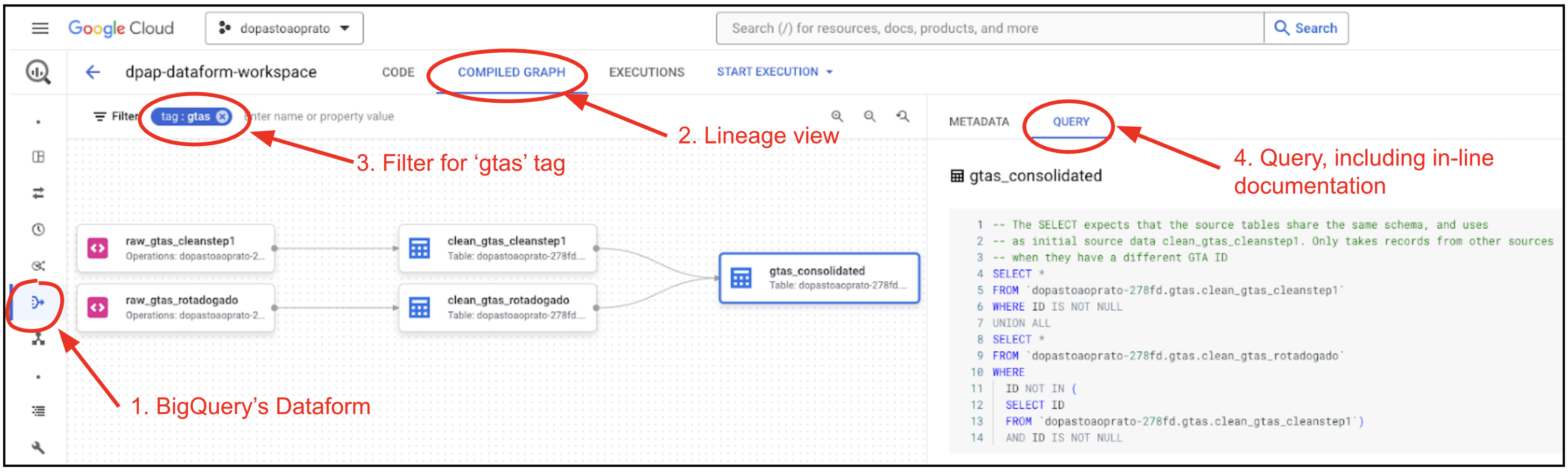
The process and code (depicted in the image below) can be seen in BigQuery Dataform -> dpap-dataform-repo -> dpap-dataform-workspace (1), and then selecting the lineage view by clicking in Compiled Graph (2), and filtering for a tag (3) - gtas for everything, or one of the gta_<vintage> tags for a single pipeline.
All source code with the SQL logic and inline documentation of GTA cleaning, consolidation and further processing are in the ErasmuszuE/dpap repo , within the bigquery-dataform branch: definitions/gtas .
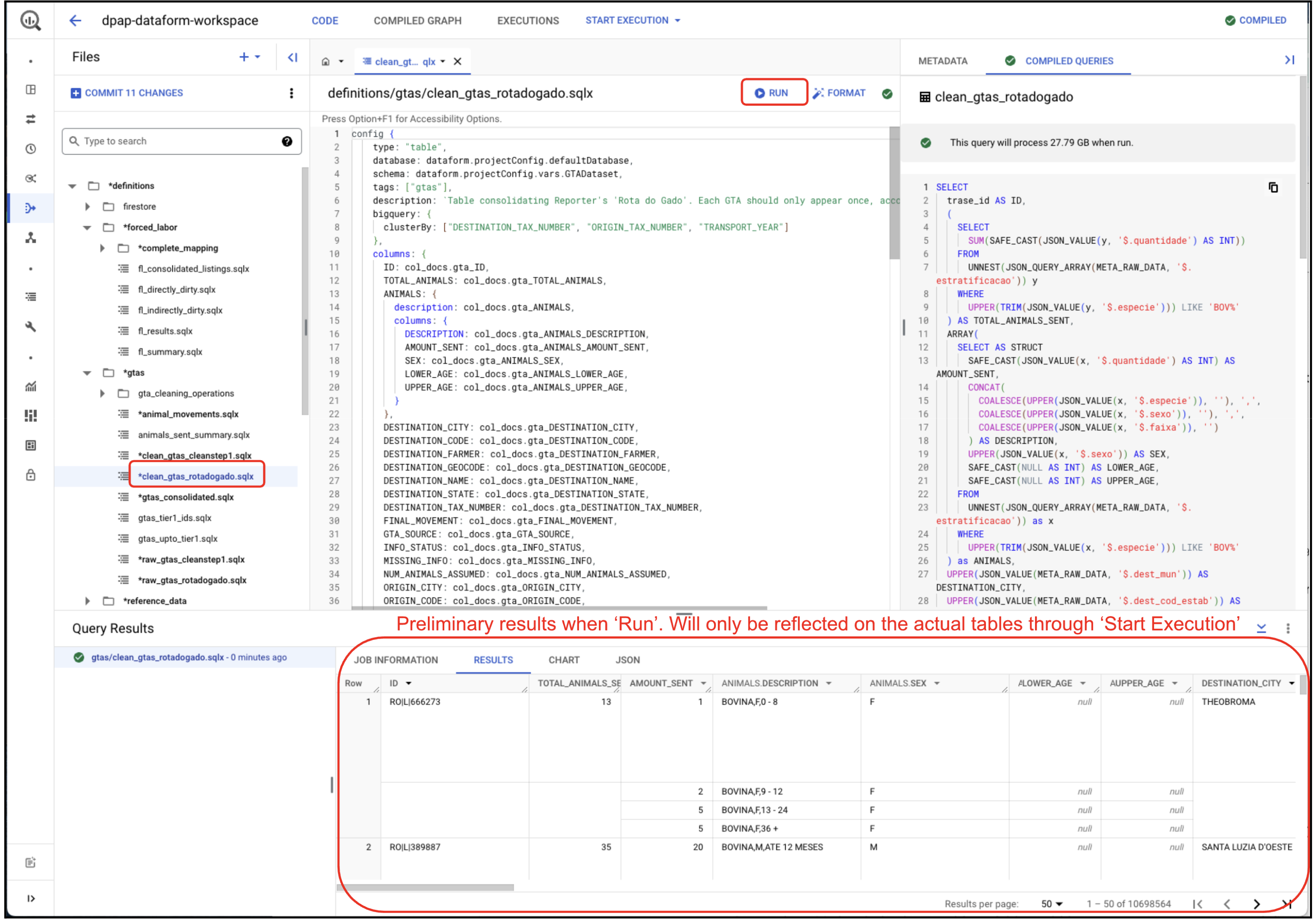
- To test the data that would be created by a table definition logic, select the table within Dataform, and click
Run. The preliminary results are shown at the bottom. Only theStart executionwill actually write the tables.
- To create or recreate the tables, do:
- Within
BigQuery Dataform -> dpap-dataform-repo -> dpap-dataform-workspace(see image above from within BigQuery Studio console)- Run
Start execution -> Tags -> gta_2026_09(the image below shows the oldergtastag; pick the vintage tag for the download you are refreshing)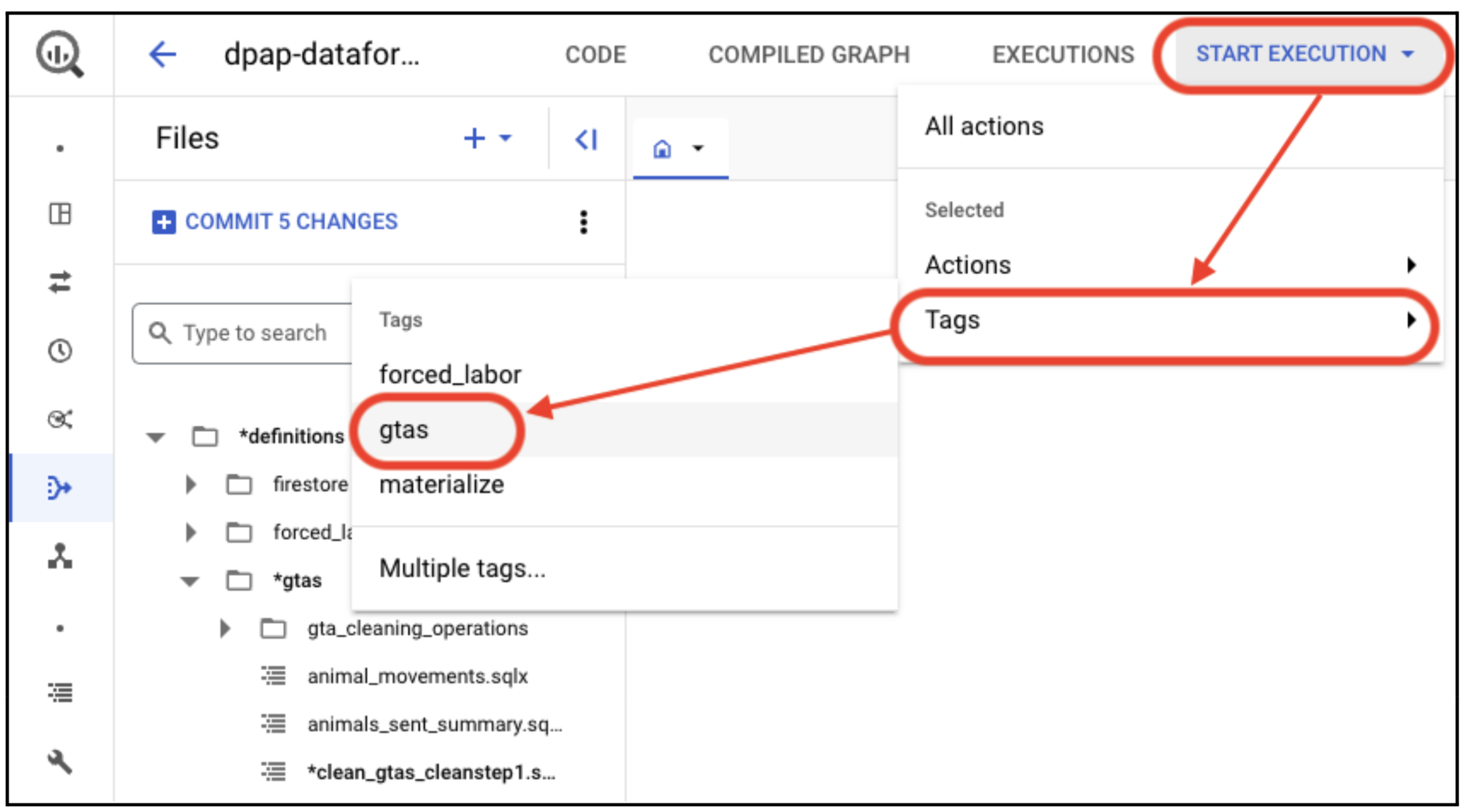
- Run
- Click
Start execution, leaving theExecution optionsun-marked.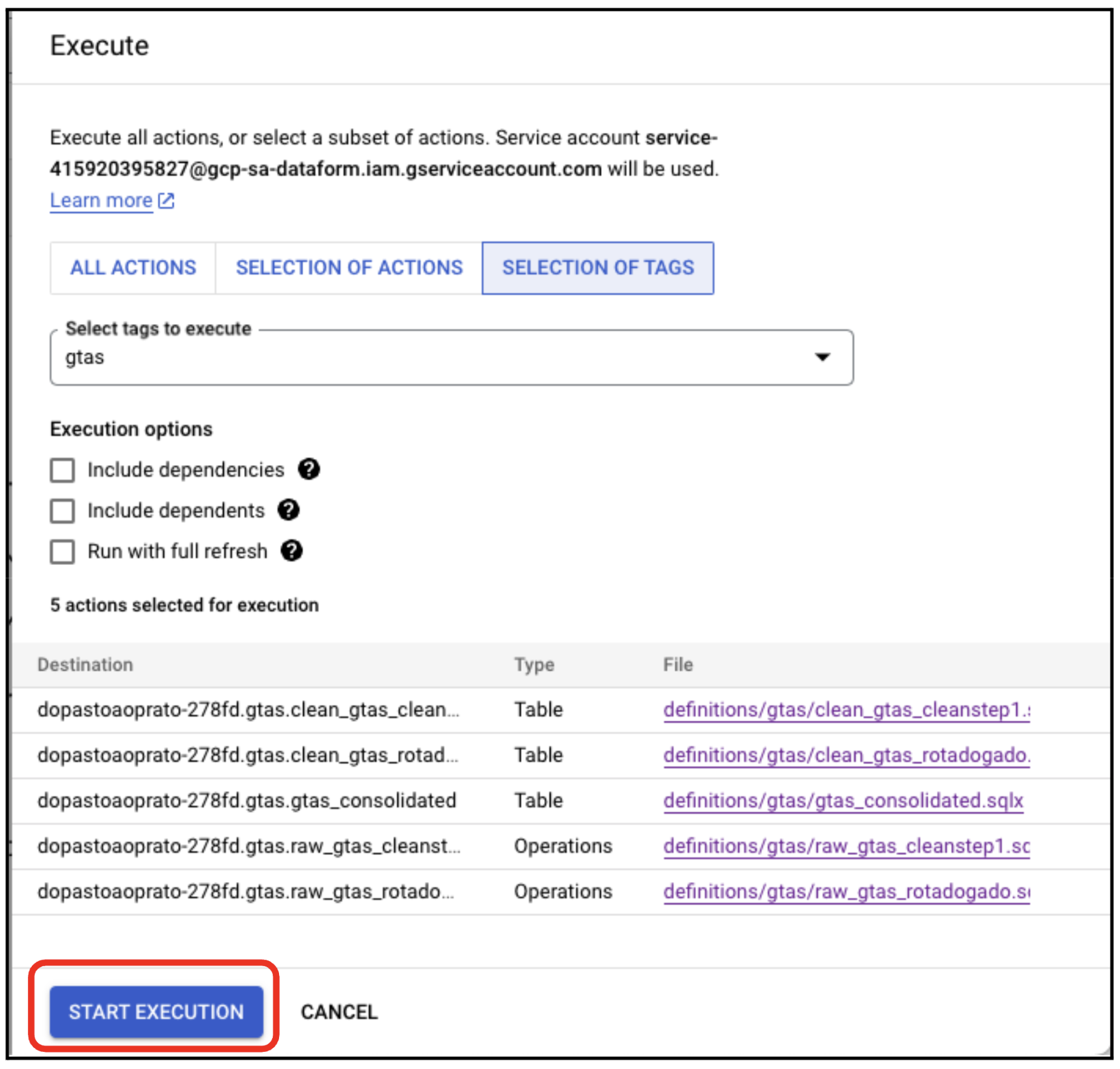
- You can also create a specific table or selection of tables by clicking on the
Selection of actionstab, and selecting them. - The detailed logic of how the raw json strings get processed to produce the intermediate clean_gtas_* tables, can be seen in the Compiled Graph (first image of this section), and then clicking the Query (4) Tab. Alternatively, browsing to the corresponding Dataform SQL (.sqlx) files in the ErasmuszuE/dpap repo , within the bigquery-dataform branch: definitions/gtas .
- The BigQuery tables can be found at:
- Consolidated:
- gtas.gtas_consolidated (~32 million rows)
- gtas.gtas_consolidated_2025_02
- gtas.gtas_consolidated_2026_09
- Clean (pre-processed):
- gtas.clean_gtas_cleanstep1 (~25.4 million rows) - shared by all three pipelines
- gtas.clean_gtas_rotadogado (~10.7 million rows)
- gtas.clean_gtas_rotadogado_2025_02
- gtas.clean_gtas_rotadogado_2026_09
- Consolidated:
How the Dataform files are laid out
In the dpap repo, bigquery-dataform branch, under definitions/gtas/ - one folder per vintage:
definitions/gtas/
├── README.md                  short orientation; points back here for the process
├── historical_clean_step_1/   raw_gtas_cleanstep1, clean_gtas_cleanstep1 - read by every vintage
├── 2023/                      files here are unsuffixed, see below
├── 2025_02/
└── 2026_09/
      ├── raw_ / clean_ / gtas_consolidated_<vintage>
      ├── cleaning_operations/   the numbered operations
      ├── downstream/            animal_movements, tier-1 tables, summaries
      └── query_results/         supporting count tables
The 2023 files are unsuffixed (gtas_consolidated.sqlx, animal_movements.sqlx) because renaming them would rename production tables and break references from definitions/forced_labor. The 2023/ folder carries the vintage instead.
Dataform takes an action's name - and therefore its BigQuery table name - from the filename, never from the folder path. So folders can be rearranged freely, but renaming a file renames its table and breaks every ref() pointing at it.
Adding the next annual pipeline
When the next download lands, copy the newest vintage folder rather than editing it. In the dpap repo, bigquery-dataform branch:
- Copy the whole newest vintage folder, e.g.
definitions/gtas/2026_09/->definitions/gtas/2027_xx/. - Rename each file's vintage suffix, then find-and-replace that suffix inside the files. It appears in more places than the filenames:
ref()calls,dependencieslists, and thetemp_data.*temporary table names - those are suffixed per vintage so two pipelines can never collide. - Point the declaration at the new raw BigQuery table (the one step 4 above wrote).
- Give every new action
tags: ["gtas", "gta_<new vintage>"]. - In the new
gtas_consolidated, point the fallback source at the previous vintage's clean table; in the new5_update_GTA_SOURCE, point the previous-labels lookup at the previous vintage's consolidated table. - Check it compiles before touching BigQuery, from the repo root:
npm install && npx @dataform/cli compile
That validates the graph - missing refs, dependency cycles, duplicate names. It does not validate the SQL against BigQuery; for that, dry-run the compiled statements (bq query --dry_run), which is free and catches errors before a run that costs real money.
Archiving the JSON files (archive_jsons_to_parquet.py)
Step 1 writes one JSON file per record, so the Rota do Gado prefixes hold ~2.8M objects - about 95% of everything under brazil/logistics/gta/. The GTA networks under network/ (2020-2023, from Neural Alpha and network/export_network.R) add another ~145k. This script copies every one of them into a partitioned Parquet table in S3, checks the copy byte for byte, and only then deletes the JSON objects. Together that is ~99.9% of the objects under brazil/logistics/gta/.
Only the current version of each file is archived. trase-storage is versioned and each annual Rota do Gado download overwrites the same keys, so the earlier downloads (2023, 2025-02) still exist as noncurrent versions of those keys - in a sample of slaughterhouses/gtas/, half the versions and more than half the bytes. Those are not archived: once a lifecycle rule expires noncurrent versions, they are gone for good.
Badly formatted files are archived like any other. Each file is stored as its exact bytes, not parsed, and is_valid_json / json_error record whether it parses. Files over 64MB (the largest are ~1.5GB) span several rows, split so that each chunk of a valid UTF-8 file still decodes on its own.
Where it goes
s3://trase-storage/brazil/logistics/gta/json_archive/
      ├── data/dataset=<dataset>/part-NNNNN.parquet   # the table
      ├── plan/<dataset>.parquet                      # every file listed, and the part it goes in
      ├── verified/<dataset>/part-NNNNN.parquet       # files that passed verification, per part
      └── delete_log/<dataset>/<timestamp>.parquet    # what `delete` deleted
brazil/logistics/gta/, json_archive/ and each archived prefix hold a README.txt pointing whoever browses S3 to the archive. The script skips those files, so they are never archived or deleted.
| dataset | prefix under brazil/logistics/gta/ |
|---|---|
slaughterhouses_gtas |
originals/rotadogado/slaughterhouses/gtas/ |
slaughterhouses_summaries |
originals/rotadogado/slaughterhouses/summaries/ |
farms_gtas |
originals/rotadogado/farms/gtas/ |
farms_gtas_filtered |
originals/rotadogado/farms/gtas_filtered/ |
farms_summaries |
originals/rotadogado/farms/summaries/ |
network_bov_out |
network/BOV/OUT/ |
network_bov_in |
network/BOV/IN/ |
network_bov_other |
network/BOV/OTHER/ |
network_por_out |
network/POR/OUT/ |
network_pou_out |
network/POU/OUT/ |
One row per file, or per chunk of a large one: key, version_id (the S3 version archived), last_modified, size, etag, sha256 of the whole file, is_valid_json, json_error, chunk_index, n_chunks, content (the bytes), archived_at.
-- each farm's GTAs, as JSON
SELECT key, string_agg(decode(content), '' ORDER BY chunk_index)::JSON AS gtas
FROM read_parquet('s3://trase-storage/brazil/logistics/gta/json_archive/data/*/*.parquet',
                  hive_partitioning = true)
WHERE dataset = 'farms_gtas' AND is_valid_json
GROUP BY key
decode fails on a file that isn't valid UTF-8; content still holds its bytes.
For anything beyond a few files, use Athena rather than DuckDB in Metabase: Athena runs on AWS's side, so a large scan cannot run out of memory the way Metabase's DuckDB does (1GB). The archive is registered in Glue as gta.json_archive, next to gta.gta_v2026_09, the consolidated GTAs of the 2026-09 download (one row per GTA, partitioned by transport_year). Both are defined by trase/data/brazil/logistics/gta/register_gta_athena_tables.py; re-run it after adding a dataset or a transport year. Athena joins across Glue databases, e.g. gta.gta_v2026_09 with s3_big_data.cnpj_2026_02.
-- in Athena (Metabase's Athena connection)
SELECT key, json_parse(from_utf8(content)) AS json
FROM gta.json_archive
WHERE dataset = 'network_bov_in' AND n_chunks = 1
LIMIT 10
From R, the network datasets are read with fn_list_archived_jsons(prefix) (key and size of every file, in place of get_bucket + object_size) and fn_read_archived_json(key) (in place of s3read_using(FUN = fromJSON)), in trase/data/brazil/logistics/gta/helpers/GTA_CLEANING_FUNCTIONS.R. fn_load_gtas_from_s3 uses them by itself for an archived key. Those helpers list the same prefixes as DATASETS in the script, so a new dataset goes in both.
For the network data there are also two parsed tables, built from the archive by trase/data/brazil/logistics/gta/network/network_tables_from_archive.py and registered in Athena as gta.network_gtas (one row per GTA record per network/<species>/OUT/ file, with the file's key and what its name says: tax number, state, transport year, end year, part) and gta.network_gta_ids (one row per GTA id of network/BOV/IN/ and network/BOV/OTHER/2020_TWO_HOPS/). fn_read_archived_json reads OUT files from network_gtas rather than parsing their JSON. Anything that did not fit those tables' schema keeps its original JSON in their irregular_record column.
Not archived: the ~1,450 JSON files under out/*/clean_step_*/, originals/data2value/ and barozzo_data/. They are few, and out/bov/clean_step_1/ is the historical source of every consolidated GTA table (see the end of this file).
Running it
Run it on a SageMaker instance in eu-west-1, the bucket's region, under tmux. It needs little disk; memory must hold one part (1GB of JSON) at a time, several times over while it is being parsed, so 32GB+ is comfortable. Each step is resumable and skips what is already done:
python archive_jsons_to_parquet.py plan      # list every file, assign each to a part
python archive_jsons_to_parquet.py archive   # download each part, write it to S3 as Parquet
python archive_jsons_to_parquet.py verify    # read each part back from S3, check it
python archive_jsons_to_parquet.py status
--dataset slaughterhouses_gtas restricts any step to one dataset - the smallest, so a sensible first run.
The plan is written once and never replaced, because the parts are defined by it. Anything written to those prefixes after the plan is simply not archived, and delete leaves those keys alone.
verify reads every part back from S3 and checks that it holds exactly the planned files, that the chunks reassemble to the listed size and the recorded sha256, and that the bytes reproduce the ETag S3 computed when the file was uploaded. That last check is the one that does not depend on this script: it compares the archive against S3's own record of the original. Only parts that pass get a verified/ manifest.
Deleting the JSON files
python archive_jsons_to_parquet.py delete                                # dry run
python archive_jsons_to_parquet.py delete --execute --max-keys 1000      # a first slice
python archive_jsons_to_parquet.py delete --execute
A key is deleted only when its current version - the exact S3 version, not just the key - is in a verified manifest. It lists the prefix again at that point, so a file overwritten since the plan is kept. The dry run says how many keys fall outside that and why. Do not run it while rotadogado_download.py is running.
On a versioned bucket, deleting adds a delete marker: the object count drops, but the bytes stay as noncurrent versions and are still recoverable - removing the delete marker restores the object:
aws s3api list-object-versions --bucket trase-storage --prefix <key>        # the marker's VersionId
aws s3api delete-object --bucket trase-storage --key <key> --version-id <marker VersionId>
The script never deletes a version permanently. That is left to a lifecycle rule on these prefixes, which expires noncurrent versions and then the leftover delete markers after a grace period (#5766). By then every current version is in the archive; the older noncurrent versions are not, and that rule removes them for good.
After deleting
Steps 2 and 3 read the GTA files from S3, and the download's summary comparison reads the stored summaries. Once the Rota do Gado JSON files are gone:
check_gtas.pyreports every deleted record asno_track.rotadogado_download.pywithout--skip_review_summariesfinds no stored summary, so it re-fetches everything. The annual refresh uses--skip_review_summariesanyway.- The next annual run still works: it writes new JSON files, and steps 2-4 read those. Moving those steps to update this table instead is a separate piece of work.
For the network datasets, the R scripts that read them already go through the archive. The exceptions are network/check_export_network.R and network/BOV/SUPPLY_SHED/ARCHIVE/ANNUAL/ASSESS_ANNUAL_VARIATION.R (old cluster setup), which say at the top what to change. Re-running network/export_network.R writes JSON files again, and all of them, since it skips only files it finds in S3.
clean_step_1 ingestion (retired scripts, reference only)
All files for this section live in historical_clean_step_1/, and each script is marked "LEGACY - DO NOT USE" at the top to make clear this isn't part of the active pipeline.
Read the folder name as "the ingestion of the historical data", not "an old way of doing the current job". The distinction matters in both directions:
- The scripts are retired. Nothing here should be run. Steps 1-4 of this Readme replaced them for every source that is still refreshed.
- The data is not.
clean_step_1is a one-time historical GTA source - an older, R-based pipeline had already integrated several GTA sources and cleaned them - and it is fully loaded in BigQuery and never re-ingested. It remains a priority source in everygtas_consolidated*table, supplying just over 20M of the 40.8M rows ingtas_consolidated_2026_09. It is not obsolete and must not be dropped.
The corresponding Dataform definitions live in definitions/gtas/historical_clean_step_1/ in the dpap repo - the same folder name as here, deliberately.
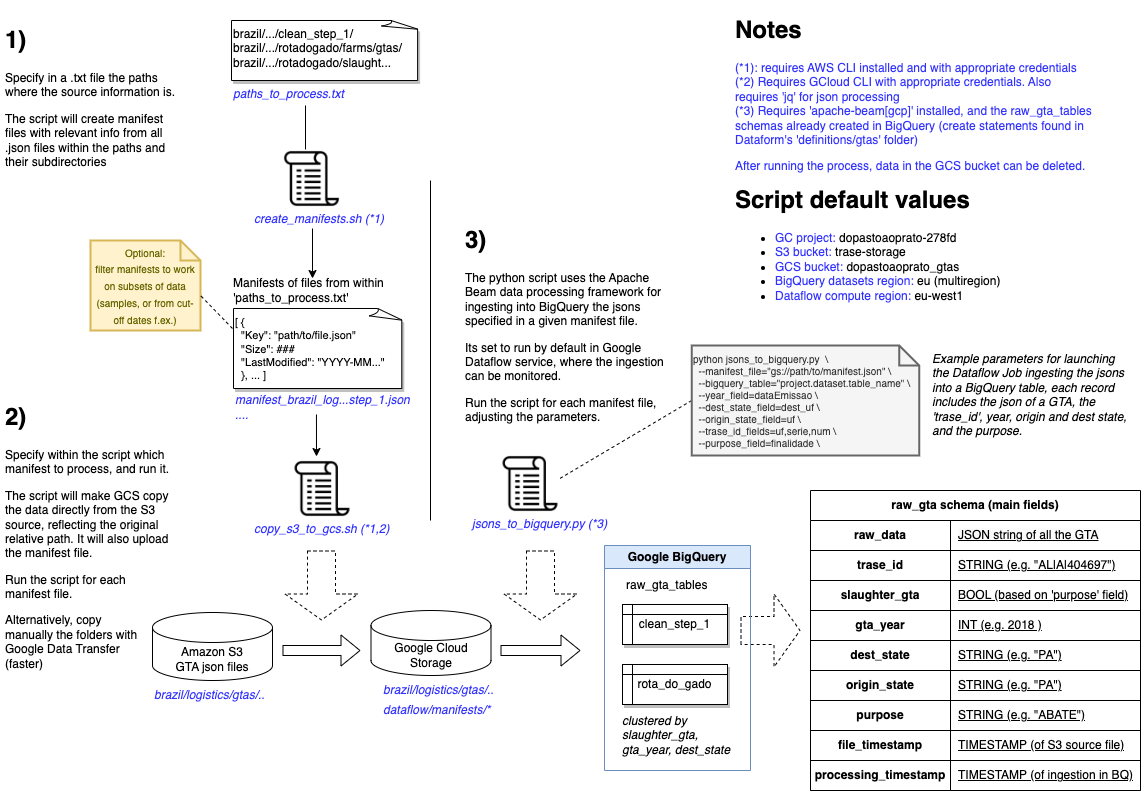
- The ingestion works by running
- A bash script
historical_clean_step_1/create_manifests.shthat generates “manifests” files listing the jsons files within the specified S3 folders, and their properties (size and timestamp) - A python script
historical_clean_step_1/jsons_to_bigquery.py. - The scripts requires valid credentials for reading from S3 and Google Cloud (for running Google Dataflow, and writing into Google Cloud Storage and BigQuery).
- The S3 source folder is defined in
historical_clean_step_1/paths_to_process.txt(brazil/logistics/gta/out/bov/clean_step_1/only - Rota do Gado's sources were removed from this file when the DuckDB-based ingestion above replaced it for that data). - These jsons end up in
gtas.raw_gtas_cleanstep1(~26 million rows, link). - Each record contains among others:
- The raw json of the specific GTA
- The S3 path of the source file
- The timestamp of the source file
- The timestamp of when the file was ingested into BigQuery
Find below an image depicting the whole process. Note that instead of running the copy_s3_to_gcs.sh script, it might be easier and quicker to use Google Data Transfer (Link to console), and specify the source S3 and destination GCS buckets. If you do this, make sure the source and destination paths remain the same.
For the running of the script in step 3, here an example call (kept for reference - this was the call used for the last raw_gtas_rotadogado load, back when this script also handled Rota do Gado):
cd historical_clean_step_1
python jsons_to_bigquery.py \
    --manifest_file="gs://dopastoaoprato_gtas/dataflow/manifests/2025_02_28_manifest_brazil_logistics_gta_originals_rotadogado_slaughterhouses_gtas.jsonl" \
    --bigquery_table="dopastoaoprato-278fd.gtas.raw_gtas_rotadogado_2025_02_28" \
    --year_field="dataEmissao" \
    --dest_state_field="dest_uf" \
    --origin_state_field="uf" \
    --trase_id_fields=uf,serie,num \
    --purpose_field="finalidade"
Keeping this directory in sync between DPAP and TRASE
This directory changes rarely - typically once a year, when a new batch of GTA data is ingested - so there's no automation keeping the two copies in sync. Whenever one repo's copy gets updated, carry the change over to the other repo by hand:
- Note what changed in this directory in the repo that has the newer version (
git log,git diff). - Copy this directory's contents over the other repo's copy, replacing what's there:
rsync -a --delete /path/to/source-repo/<this-directory>/ /path/to/target-repo/<this-directory>/ - TRASE's path:
trase/data/brazil/logistics/gta/gta_update - DPAP's path:
scripts/DATA/gta_update --deletemakes the target match exactly, including removing anything that was deleted at the source.
The first sync to DPAP is a replacement, not an update. DPAP currently has scripts/DATA/BIGQUERY_LOAD, which predates the 2026 rework: the download script was in a different directory, check_gtas.py sat with the load scripts, and historical_clean_step_1/ was still called legacy_clean_step_1/. Create scripts/DATA/gta_update from this directory and delete scripts/DATA/BIGQUERY_LOAD in the same commit, rather than rsync-ing into the old path.
3. In the target repo, check git status and git diff before staging anything - watch out for stray untracked files (e.g. __pycache__, logs/, retry_records_*.txt) that shouldn't be committed.
4. Commit the result as a single commit in the target repo, and open a PR there as usual.
This doesn't carry over commit history for the change. This shouldn't be a problem - if you ever need the detailed history behind a specific past change to this directory, look it up in whichever repo it actually happened in; each repo keeps its own real history of edits made there.